

Step 6: Prescribed Slow Slip Events#
This example simulates several slow slip events on the slab interface.
We prescribe a time history of slip, varying the slip amplitude as a function of time.
We also output the displacement field at fake GNSS stations using OutputSolnPoints.
For this simulation, we use linearly elastic materials.
Fig. 155 shows the boundary conditions on the domain.
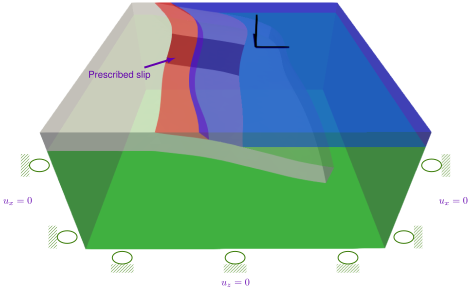
Fig. 155 Boundary conditions for prescribed slow slip. We prescribe time-varying slip on a patch within the subduction interface with roller boundary conditions on the lateral sides and bottom of the domain.#
Features
Tetrahedral cells
pylith.meshio.MeshIOCubit
pylith.problems.TimeDependent
pylith.meshio.OutputSolnBoundary
pylith.meshio.DataWriterHDF5
pylith.bc.DirichletTimeDependent
pylith.bc.ZeroDB
spatialdata.geocoords.CSGeo
pylith.materials.Elasticity
pylith.materials.IsotropicLinearElasticity
spatialdata.spatialdb.SimpleDB
Quasi-static simulation
Temporal database
pylith.meshio.OutputSolnPoints
pylith.faults.KinSrcTimeHistory
spatialdata.geocoords.CSGeo
spatialdata.spatialdb.UniformDB
spatialdata.spatialdb.SimpleGridDB
spatialdata.spatialdb.SimpleGridAscii
Simulation parameters#
The parameters specific to this example are in step06_slowslip.cfg and include:
pylithapp.metadataMetadata for this simulation. Even when the author and version are the same for all simulations in a directory, we prefer to keep that metadata in each simulation file as a reminder to keep it up-to-date for each simulation.pylithappParameters defining where to write the output.pylithapp.problemParameters for the time step information as well as solution field with displacement and Lagrange multiplier subfields.pylithapp.interfacesParameters for the time-varying slip on the top of the slab.
For slow slip we use the KinSrcTimeHistory kinematic source to prescribe time-varying slip. We also use OutputSolnPoints to simulate output at continuous GNSS stations.
Prior to running the simulation, we use the generate_slowslip.py Python script to generate spatial database input files for the prescribed slip.
# Generate fault_slabtop_slowslip.spatialdb and fault_slabtop_slowslip.timedb.
$ ./generate_slowslip.py
Note
The GNSS station file for use with the mesh from Gmsh (cgnss_stations.txt) requires elevation values consistent with the topography in the model.
The generate_cgnss.py Python script uses the ground surface output from Step 1 to set the elevation of stations just below the ground surface consistent with the topogrpahy.
$ pylith step06_slowslip.cfg mat_elastic.cfg
>> /software/pylith-opt/lib/python3.12/site-packages/pylith/apps/PyLithApp.py:77:main
-- pylithapp(info)
-- Running on 1 process(es).
>> /software/pylith-opt/lib/python3.12/site-packages/pylith/meshio/MeshIOObj.py:41:read
-- meshiopetsc(info)
-- Reading finite-element mesh
>> /src/cig/pylith/libsrc/pylith/meshio/MeshIO.cc:74:void pylith::meshio::MeshIO::read(pylith::topology::Mesh*, bool)
-- meshiopetsc(info)
-- Component 'meshiopetsc.reader': Domain bounding box:
    (-400000, 400000)
    (-400000, 400000)
    (-400000, 2017.5)

# -- many lines omitted --
>> /src/cig/pylith/libsrc/pylith/utils/PetscOptions.cc:262:static void pylith::utils::_PetscOptions::write(pythia::journal::info_t&, const char*, const pylith::utils::PetscOptions&)
-- petscoptions(info)
-- Setting PETSc options:
dm_reorder_section = true
dm_reorder_section_type = cohesive
ksp_converged_reason = true
ksp_error_if_not_converged = true
ksp_gmres_restart = 100
ksp_guess_pod_size = 8
ksp_guess_type = pod
ksp_rtol = 1.0e-14
mg_fine_ksp_max_it = 5
mg_fine_pc_type = vpbjacobi
pc_type = gamg
snes_atol = 5.0e-7
snes_converged_reason = true
snes_error_if_not_converged = true
snes_monitor = true
snes_rtol = 1.0e-14
ts_error_if_step_fails = true
ts_exact_final_time = matchstep
ts_monitor = true
ts_type = beuler
viewer_hdf5_collective = true

# -- many lines omitted --

15 TS dt 5.4757e-05 time 0.000766598
    0 SNES Function norm 1.140833293430e-01
      Linear solve converged due to CONVERGED_ATOL iterations 0
    1 SNES Function norm 1.386302589692e-08
    Nonlinear solve converged due to CONVERGED_FNORM_ABS iterations 1
16 TS dt 5.4757e-05 time 0.000821355
>> /software/pylith-opt/lib/python3.12/site-packages/pylith/problems/Problem.py:232:finalize
-- timedependent(info)
-- Finalizing problem.
The beginning of the output is nearly the same as in previous examples. The simulation advances 16 time steps.
$ pylith step06_slowslip.cfg step06_slowslip_subit.cfg mat_elastic.cfg
Visualizing the results#
In Fig. 156 we use the pylith_viz utility to visualize the x displacement field.
You can move the slider or use the p and n keys to change the increment or decrement time.
pylith_viz --filename=output/step06_slowslip-domain.h5 warp_grid --component=x --exaggeration=10000
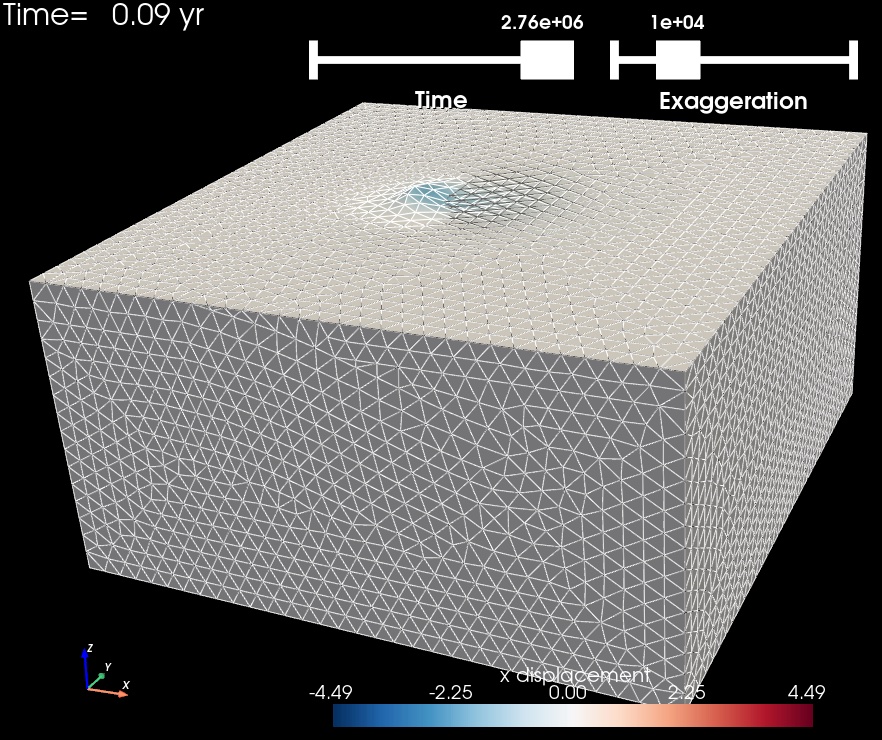
Fig. 156 Solution for Step 6 at t=0.08 yr. The colors of the shaded surface indicate the x displacement, and the deformation is exaggerated by a factor of 10,000.#