Step 2: Quasistatic Interseismic Deformation#
In this example we simulate the interseismic deformation associated with the oceanic crust subducting beneath the continental crust and into the mantle. We prescribe steady aseismic slip of 8 cm/yr along the interfaces between the oceanic crust and mantle with the interface between the oceanic crust and continental crust locked as shown in Fig. 93. We adjust the Dirichlet (displacement) boundary conditions on the lateral edges and bottom of the domain by pinning only the portions of the boundaries that are mantle and continental crust and not oceanic crust.
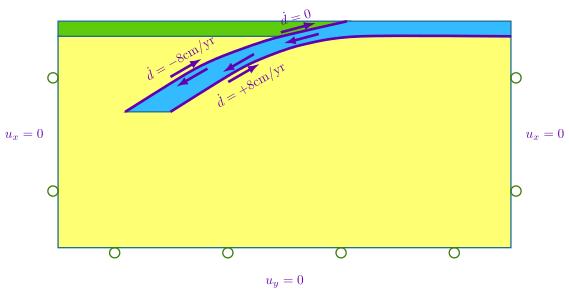
Fig. 93 Boundary conditions for quasistatic simulation for interseismic deformation. We prescribe constant creep on the top and bottom of the subduction slab, except for the portion of the subduction interface where we imposed coseismic slip in Step 1. We lock (zero creep) that part of the interface.#
Features
Triangular cells
field split preconditioner
Schur complement
pylith.meshio.MeshIOPetsc
pylith.problems.TimeDependent
pylith.materials.Elasticity
pylith.materials.IsotropicLinearElasticity
pylith.meshio.OutputSolnBoundary
pylith.meshio.DataWriterHDF5
Static simulation
pylith.faults.FaultCohesiveKin
pylith.bc.DirichletTimeDependent
spatialdata.spatialdb.SimpleDB
spatialdata.spatialdb.UniformDB
pylith.faults.KinSrcConstRate
pylith.bc.ZeroDB
Simulation parameters#
The parameters specific to this example are in step02_interseismic.cfg.
These include:
pylithapp.metadataMetadata for this simulation. Even when the author and version are the same for all simulations in a directory, we prefer to keep that metadata in each simulation file as a reminder to keep it up-to-date for each simulation.pylithappParameters defining where to write the output.pylithapp.problemParameters defining the start time and end time for the quasistatic simulation.pylithapp.problem.faultParameters for prescribed slip on the fault.pylithapp.problem.bcParameters for velocity boundary conditions.
$ pylith step02_interseismic.cfg

# The output should look something like the following.
 >> /software/unix/py39-venv/pylith-debug/lib/python3.9/site-packages/pylith/meshio/MeshIOObj.py:44:read
 -- meshiopetsc(info)
 -- Reading finite-element mesh
 >> /src/cig/pylith/libsrc/pylith/meshio/MeshIO.cc:94:void pylith::meshio::MeshIO::read(topology::Mesh *)
 -- meshiopetsc(info)
 -- Component 'reader': Domain bounding box:
    (-600000, 600000)
    (-600000, 399.651)

# -- many lines omitted --

30 TS dt 0.05 time 1.45
    0 SNES Function norm 5.748198604376e-02
    Linear solve converged due to CONVERGED_ATOL iterations 178
    1 SNES Function norm 1.124343852602e-11
  Nonlinear solve converged due to CONVERGED_FNORM_ABS iterations 1
31 TS dt 0.05 time 1.5
 >> /software/unix/py39-venv/pylith-debug/lib/python3.9/site-packages/pylith/problems/Problem.py:201:finalize
 -- timedependent(info)
 -- Finalizing problem.
The beginning of the output written to the terminal is identical to that from Step 1. At the end of the output, we see that the simulation advanced the solution 31 time steps. Remember that the PETSc TS monitor shows the nondimensionalized time and time step values.
Visualizing the results#
In Fig. 94 we use ParaView to visualize the x displacement field using the viz/plot_dispwarp.py Python script.
First, we start ParaView from the examples/subduction-2d directory.
Next, we override the default name of the simulation file with the name of the current simulation.
>>> SIM = "step02_interseismic"
Finally, we run the viz/plot_dispwarp.py Python script as described in ParaView Python Scripts.
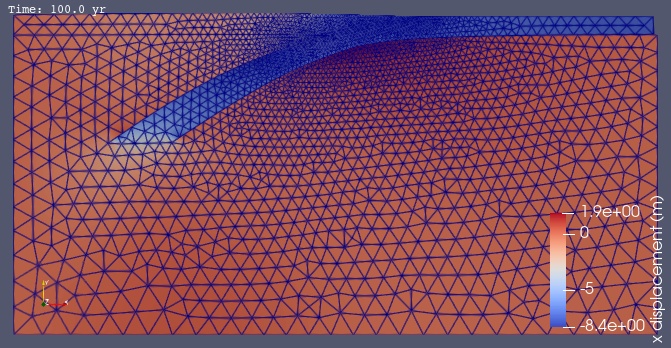
Fig. 94 Solution for Step 2 at t=100 yr. The colors of the shaded surface indicate the magnitude of the x displacement, and the deformation is exaggerated by a factor of 1000.#