
Horizontal Cross-Section of Strike-Slip Fault (2D)#
The files are in the directory examples/strikeslip-2d.
The files and directories for this set of examples includes:
README.mdREADME file containing a brief description of the various examples.
*.cfgPyLith parameter files.
generate_gmsh.pyPython script to generate the finite-element mesh using Gmsh.
*.mshGmsh finite-element mesh files generated by Gmsh.
*.jouFiles used to construct the finite-element mesh using Cubit.
*.exoExodus II finite-element mesh files generated by Cubit.
*.spatialdbSpatial database filesFiles associated with the spatial databases.
vizDirectory containing ParaView Python scripts and other files for visualizing results.
outputDirectory containing simulation output. It is created automatically when running the simulations.
Overview#
This suite of examples demonstrates some basic concepts of using PyLith to solve the static and quasistatic boundary elasticity equation for a horizontal cross-section of a strike-slip fault (Fig. 48) with nonuniform material properties. The fault extends the entire length of the domain. The shear modulus is larger on the +x side of the fault. This example builds on the previous examples and adds complexity through a series of steps:
- Step 1
Static coseismic slip with Dirichlet (displacement) boundary conditions.
- Step 2
Quasistatic coseismic slip with time-dependent Dirichlet (displacement) boundary conditions.
- Step 3
Quasistatic slip with two ruptures and time-dependent Dirichlet (displacement) boundary conditions.
- Step 4
Variable slip and Dirichlet (displacement) boundary conditions.
- Step 5
Static Green’s functions with Dirichlet (displacement) boundary conditions.
- Step 6
Invert for slip in Step 4 using Green’s functions from Step 5.
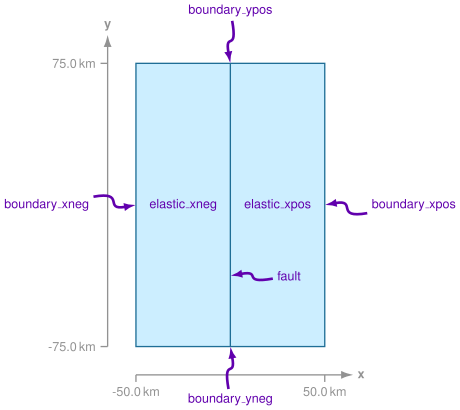
Fig. 48 Diagram of geometry for domain with a strike-slip fault. The domain extends from -50 km to +50 km in the x direction and from -75 km to +75 km in the y direction. We refer to the domain boundaries using the names shown in the diagram.#
Important
We decribe how to generate the finite-element mesh using both Gmsh and Cubit. The files for both methods are included. For Step 1 we provide PyLith parameter files for both meshes; for Steps 2 and 3 we only provide the Parameter files that use the Gmsh file.
Example Workflow#
- Gmsh Mesh
- Cubit Mesh
- Common Information
- Step 1: Static Coseismic Slip
- Step 2: Single Earthquake Rupture and Velocity Boundary Conditions
- Step 3: Multiple Earthquake Ruptures and Velocity Boundary Conditions
- Step 4: Variable Coseismic Slip
- Step 5: Green’s Functions
- Step 6: Fault Slip Inversion
- Suggested Exercises