Step 2: Shear Displacement#
This example corresponds to shear deformation due to Dirichlet (displacement) boundary conditions.
We apply Dirichlet (displacement) boundary conditions for the y displacement on the +x (boundary_xpos) and -x (boundary_xneg) boundaries and for the x displacement on the +y (boundary_ypos) and -y (boundary_yneg) boundaries.
Fig. 39 shows the boundary conditions on the domain.
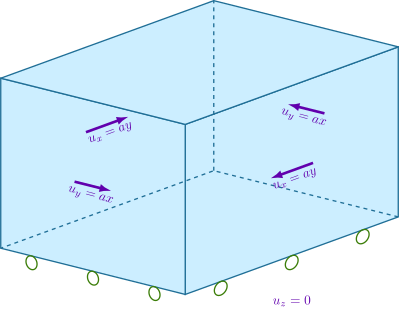
Fig. 41 Boundary conditions for shear deformation. We constrain the y displacement on the +x and -x boundaries and the x displacement on the +y and -y boundaries.#
Features
Tetrahedral cells
pylith.meshio.MeshIOPetsc
pylith.problems.TimeDependent
pylith.materials.Elasticity
pylith.materials.IsotropicLinearElasticity
spatialdata.spatialdb.UniformDB
pylith.meshio.OutputSolnBoundary
pylith.meshio.DataWriterHDF5
Static simulation
LU preconditioner
pylith.bc.DirichletTimeDependent
spatialdata.spatialdb.SimpleDB
spatialdata.spatialdb.ZeroDB
Simulation parameters#
The parameters specific to this example are in step02_sheardisp.cfg.
These include:
pylithapp.metadataMetadata for this simulation. Even when the author and version are the same for all simulations in a directory, we prefer to keep that metadata in each simulation file as a reminder to keep it up-to-date for each simulation.pylithappParameters defining where to write the output.pylithapp.problem.solutionSpecify the basis order for the solution fields, in this case thedisplacementfield.pylithapp.problem.bcParameters for the boundary conditions. The displacement field varies along the boundary, so we use aSimpleDBspatial database and thelinearquery type.
$ pylith step02_sheardisp.cfg

# The output should look something like the following.
 >> /software/unix/py39-venv/pylith-debug/lib/python3.9/site-packages/pylith/meshio/MeshIOObj.py:44:read
 -- meshiopetsc(info)
 -- Reading finite-element mesh
 >> /src/cig/pylith/libsrc/pylith/meshio/MeshIO.cc:94:void pylith::meshio::MeshIO::read(topology::Mesh *)
 -- meshiopetsc(info)
 -- Component 'reader': Domain bounding box:
    (-6000, 6000)
    (-6000, 6000)
    (-9000, 0)

# -- many lines omitted --

 >> /software/unix/py39-venv/pylith-debug/lib/python3.9/site-packages/pylith/problems/TimeDependent.py:139:run
 -- timedependent(info)
 -- Solving problem.
0 TS dt 0.01 time 0.
    0 SNES Function norm 1.811215061775e-02
    Linear solve converged due to CONVERGED_ATOL iterations 1
    1 SNES Function norm 2.330640615892e-17
  Nonlinear solve converged due to CONVERGED_FNORM_ABS iterations 1
1 TS dt 0.01 time 0.01
 >> /software/unix/py39-venv/pylith-debug/lib/python3.9/site-packages/pylith/problems/Problem.py:201:finalize
 -- timedependent(info)
 -- Finalizing problem.
The output written to the terminal is nearly identical to what we saw for Step 1.
Visualizing the results#
In Fig. 42 we use ParaView to visualize the x displacement field using the viz/plot_dispwarp.py Python script.
First, we start ParaView from the examples/box-2d directory.
$ PATH_TO_PARAVIEW/paraview

# For macOS, it will be something like
$ /Applications/ParaView-5.10.1.app/Contents/MacOS/paraview
Next, we override the default name of the simulation file with the name of the current simulation.
>>> SIM = "step02_sheardisp"
Finally, we run the viz/plot_dispwarp.py Python script as described in ParaView Python Scripts.
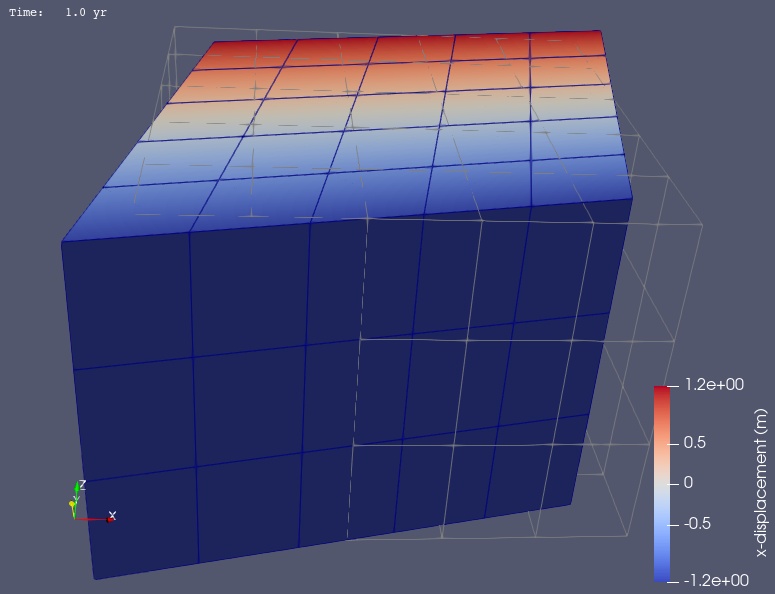
Fig. 42 Solution for Step 2. The colors of the shaded surface indicate the magnitude of the x displacement, and the deformation is exaggerated by a factor of 1000. The undeformed configuration is show by the gray wireframe.#