

Step 7: Bayesian Fault Slip Inversion#
Danger
This examples requires the CATMIP Bayesian inversion framework which is not yet publicly available.
In this example we perform the same inversion as in Step 6, but replace the least squares inversion with the CATMIP Bayesian inversion framework. We demonstrate inverting for fault slip using both the original CATMIP algorithm (Step 7a) and the crossfade CATMIP algorithm (Step 7b).
We assume a uniform distribution with positive slip values but use a logistic (sigmoid) distribution to compute the probability. This helps prevent back slip.
Inversion using original CATMIP algorithm#
The catmip_pylith_staticslip executable uses the original CATMIP algorithm and must be run using at least 2 processes (1 manager process and at least 1 worker process).
The model parameters for the inversion are specified in step07a_catmip.in (general CATMIP parameters) and catmip_parameters.txt (specific to the PyLith static slip model).
Currently, the catmip_parameters.txt filename is hardwired in the PyLith static slip model code.
# Use 100 samples and Markov chains with a length of 50
N                100
Nsteps           50

# Use the current directory for user input and write output files as output/step07a-catmip-
data_directory   .
output_directory ./output
output_prefix    step07a_catmip-
# Sample parameter file for pylith_catmip model.

# Data files
filename_observations = output/step04_varslip-gnss_stations.h5
filename_greens_fns = output/step05_greensfns-gnss_stations.h5

# Model parameters
rake_parallel_prior = logistic
rake_parallel_prior_k = 25.0
rake_parallel_prior_min_sample_value = 0.01
rake_parallel_prior_max_sample_value = 2.0

rake_perpendicular_prior = gaussian

# For a 2D problem we only have 1 component of slip.
num_impulse_components = 1
mpiexec -n 2 catmip_pylith_staticslip step07a_catmip.in
By default, the CATMIP code will write the results of the inversion to output/step07a_catmip-*.
The .gsl files are raw binary files that can be read using Python.
Step 7a: Plotting the results#
If you are using the PyLith binary, which includes the matplotlib Python module, or have it installed, then you can plot the results of the simulation using the viz/plot_catmip_results.py Python script.
viz/plot_catmip_results.py --catmip-theta=output/step07a_catmip-theta20.bin
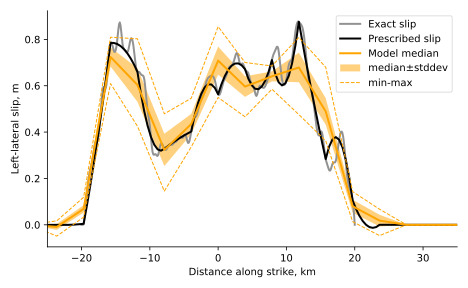
Fig. 74 Results of slip inversion in Step 7a. The thick black line shows the prescribed slip in Step 4, and the thick gray line shows the raw (exact) slip. The solid orange line shows the median slip, the shaded orange regions shows the median plus and minus one standard deviation, and the dashed lines show the minimum and maximum values. The median values are almost identical to the results with minimal smoothing in Step 6.#
::{tip}
You can pass--no-gui as a command line argument to the plotting script turn off displaying the plot window.
This is useful if you do not have a matplotlib GUI backend.
Inversion using CF-CATMIP algorithm
The cfcatmip_pylith_staticslip executable uses the CF-CATMIP algorithm and must be run using at least 2 processes (1 manager process and at least 1 worker process).
The model parameters for the inversion are specified in step07b_cfcatmip.in (general CATMIP parameters) and cfcatmip_parameters.txt (specific to the PyLith static slip model).
Currently, the cfcatmip_parameters.txt filename is hardwired in the PyLith static slip model code.
We use the same parameters for the prior distribution of model parameters.
For the conjugate posterior distribution, we use a Gaussian distribution with broad enough parameters to sample the parameter space; the CF-CATMIP algorithm is not particularly sensitive to the median and standard deviation of the conjugate posterior Gaussian distribution.
# Use 100 samples and Markov chains with a length of 50
N                100
Nsteps           50

# Use the current directory for user input and write output files as output/step07b-cfcatmip-
data_directory   .
output_directory ./output
output_prefix    step07b_cfcatmip-
# Sample parameter file for pylith_catmip model.

# Data files
filename_observations = output/step04_varslip-gnss_stations.h5
filename_greens_fns = output/step05_greensfns-gnss_stations.h5

# Model parameters
rake_parallel_prior = logistic
rake_parallel_prior_k = 25.0
rake_parallel_prior_min_sample_value = 0.01
rake_parallel_prior_max_sample_value = 2.0

rake_perpendicular_prior = gaussian

conjugate_posterior = gaussian
conjugate_posterior_median = 0.5
conjugate_posterior_stddev = 0.2

num_impulse_components = 1
mpiexec -n 2 cfcatmip_pylith_staticslip step07b_cfcatmip.in
By default, the CATMIP code will write the results of the inversion to output/step07b_catmip-*.
The .gsl files are raw binary files that can be read using Python.
Step 7b: Plotting the results
If you are using the PyLith binary, which includes the matplotlib Python module, or have it installed, then you can plot the results of the simulation using the viz/plot_catmip_results.py Python script.
viz/plot_catmip_results.py --catmip-theta=output/step07b_cfcatmip-theta1.bin
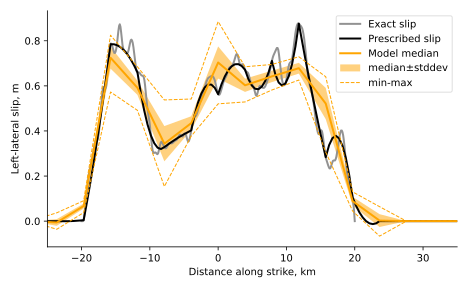
Fig. 75 Results of slip inversion in Step 7b. The thick black line shows the prescribed slip in Step 4, and the thick gray line shows the raw (exact) slip. The solid orange line shows the median slip, the shaded orange regions shows the median plus and minus one standard deviation, and the dashed lines show the minimum and maximum values. The results are almost identical to those in Step 7a.#