Step 2: Shear Displacement#
Features
Quadrilateral cells
pylith.meshio.MeshIOAscii
pylith.problems.TimeDependent
pylith.materials.Elasticity
pylith.materials.IsotropicLinearElasticity
spatialdata.spatialdb.UniformDB
pylith.meshio.DataWriterHDF5
Static simulation
LU preconditioner
pylith.bc.DirichletTimeDependent
spatialdata.spatialdb.SimpleDB
Simulation parameters#
This example corresponds to shear deformation due to Dirichlet (displacement) boundary conditions.
We apply Dirichlet (displacement) boundary conditions for the y displacement on the +x (boundary_xpos) and -x (boundary_xneg) boundaries and for the x displacement on the +y (boundary_ypos) and -y (boundary_yneg) boundaries.
Fig. 26 shows the boundary conditions on the domain.
The parameters specific to this example are in step02_sheardisp.cfg.
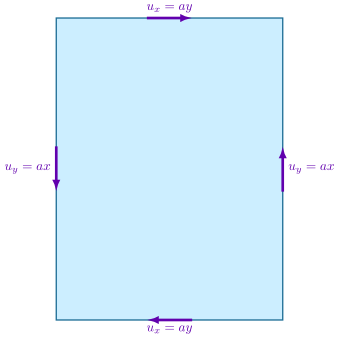
Fig. 28 Boundary conditions for shear deformation. We constrain the y displacement on the +x and -x boundaries and the x displacement on the +y and -y boundaries.#
We create an array of 4 DirichletTimeDependent boundary conditions.
For each of these boundary conditions we must specify which degrees of freedom are constrained, the name of the label marking the boundary (name of the group of vertices in the finite-element mesh file), and the values for the Dirichlet boundary condition.
The displacement field varies along each boundary, so we use a SimpleDB spatial database and the linear query type.
[pylithapp.problem]
bc = [bc_xneg, bc_yneg, bc_xpos, bc_ypos]
bc.bc_xneg = pylith.bc.DirichletTimeDependent
bc.bc_yneg = pylith.bc.DirichletTimeDependent
bc.bc_xpos = pylith.bc.DirichletTimeDependent
bc.bc_ypos = pylith.bc.DirichletTimeDependent

# Degree of freedom (dof) 1 corresponds to y displacement.
constrained_dof = [1]
label = boundary_xneg
db_auxiliary_field = spatialdata.spatialdb.SimpleDB
db_auxiliary_field.description = Dirichlet BC -x edge
db_auxiliary_field.iohandler.filename = sheardisp_bc_xneg.spatialdb
db_auxiliary_field.query_type = linear
Running the simulation#
$ pylith step02_sheardisp.cfg

# The output should look something like the following.
 >> /software/unix/py39-venv/pylith-debug/lib/python3.9/site-packages/pylith/meshio/MeshIOObj.py:44:read
 -- meshioascii(info)
 -- Reading finite-element mesh
 >> /src/cig/pylith/libsrc/pylith/meshio/MeshIO.cc:94:void pylith::meshio::MeshIO::read(topology::Mesh *)
 -- meshioascii(info)
 -- Component 'reader': Domain bounding box:
    (-6000, 6000)
    (-16000, -0)

# -- many lines omitted --

 >> /software/unix/py39-venv/pylith-debug/lib/python3.9/site-packages/pylith/problems/TimeDependent.py:139:run
 -- timedependent(info)
 -- Solving problem.
0 TS dt 0.01 time 0.
    0 SNES Function norm 2.239977678460e-03
    Linear solve converged due to CONVERGED_ATOL iterations 1
    1 SNES Function norm 1.964321818484e-18
  Nonlinear solve converged due to CONVERGED_FNORM_ABS iterations 1
1 TS dt 0.01 time 0.01
 >> /software/unix/py39-venv/pylith-debug/lib/python3.9/site-packages/pylith/problems/Problem.py:201:finalize
 -- timedependent(info)
 -- Finalizing problem.
The output written to the terminal is nearly identical to what we saw for Step 1. We omit the middle portion of the output which shows that the domain, the scales for nondimensionalization, and PETSc options all remain the same.
Visualizing the results#
In Fig. 29 we use the pylith_viz utility to visualize the x displacement field.
pylith_viz --filenames=output/step02_sheardisp-domain.h5 warp_grid --component=x

Fig. 29 Solution for Step 2. The colors of the shaded surface indicate the magnitude of the x displacement, and the deformation is exaggerated by a factor of 1000. The undeformed configuration is shown by the gray wireframe.#