

Step 3: Shear Displacement and Tractions#
Features
Quadrilateral cells
pylith.meshio.MeshIOAscii
pylith.problems.TimeDependent
pylith.materials.Elasticity
pylith.materials.IsotropicLinearElasticity
spatialdata.spatialdb.UniformDB
pylith.meshio.DataWriterHDF5
Static simulation
LU preconditioner
pylith.bc.DirichletTimeDependent
pylith.bc.NeumannTimeDependent
spatialdata.spatialdb.SimpleDB
Simulation parameters#
In Step 3 we replace the Dirichlet (displacement) boundary conditions on the +y and -y boundaries with equivalent Neumann (traction) boundary conditions.
In order to maintain symmetry and prevent rigid body motion, we constrain both the x and y displacements on the +x and -x boundaries.
The solution matches that in Step 2.
Fig. 31 shows the boundary conditions on the domain.
The parameters specific to this example are in step03_sheardisptract.cfg.
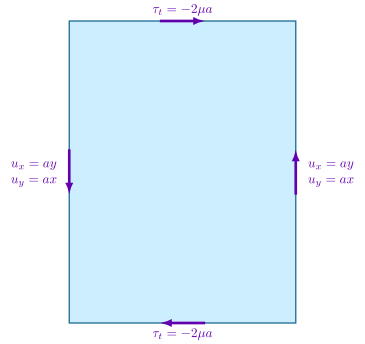
Fig. 31 Boundary conditions for shear deformation. We constrain the x and y displacements on the +x and -x boundaries. We apply tangential (shear) tractions on the +y and -y boundaries.#
The tractions are uniform on each of the two boundaries, so we use a UniformDB.
In PyLith the direction of the tangential tractions in 2D is defined by the cross product of the +z direction and the outward normal on the boundary.
On the +y boundary a positive tangential traction is in the -x direction, and on the -y boundary a positive tangential traction is in the +x direction.
We want tractions in the opposite direction as shown by the arrows in Fig. 31, so we apply negative tangential tractions.
[pylithapp.problem]
bc = [bc_xneg, bc_yneg, bc_xpos, bc_ypos]
bc.bc_xneg = pylith.bc.DirichletTimeDependent
bc.bc_xpos = pylith.bc.DirichletTimeDependent
bc.bc_yneg = pylith.bc.NeumannTimeDependent
bc.bc_ypos = pylith.bc.NeumannTimeDependent

[pylithapp.problem.bc.bc_xneg]
# Degrees of freedom (dof) 0 and 1 correspond to the x and y displacements.
constrained_dof = [0, 1]
label = boundary_xneg
db_auxiliary_field = spatialdata.spatialdb.SimpleDB
db_auxiliary_field.description = Dirichlet BC -x boundary
db_auxiliary_field.iohandler.filename = sheardisp_bc_xneg.spatialdb
db_auxiliary_field.query_type = linear

[pylithapp.problem.bc.bc_yneg]
label = boundary_yneg
db_auxiliary_field = spatialdata.spatialdb.UniformDB
db_auxiliary_field.description = Neumann BC -y boundary
db_auxiliary_field.values = [initial_amplitude_tangential, initial_amplitude_normal]
db_auxiliary_field.data = [-4.5*MPa, 0*MPa]
Running the simulation#
$ pylith step03_sheardisptract.cfg

# The output should look something like the following.
>> software/pylith-debug/lib/python3.12/site-packages/pylith/apps/PyLithApp.py:79:main
-- info (application-flow)
-- Running on 1 process(es).

# -- many lines omitted --
>> src/cig/pylith/libsrc/pylith/problems/TimeDependent.cc:473:void pylith::problems::TimeDependent::solve()
-- info (application-flow)
-- Component 'timedependent.problem': Solving equations.
0 TS dt 0.001 time 0.
    0 SNES Function norm 1.817939142477e+01
      Linear solve converged due to CONVERGED_ATOL iterations 3
    1 SNES Function norm 8.280473801872e-08
    Nonlinear solve converged due to CONVERGED_FNORM_ABS iterations 1
1 TS dt 0.001 time 0.001
>> software/pylith-debug/lib/python3.12/site-packages/pylith/problems/Problem.py:222:finalize
-- info (application-flow)
-- Finalizing problem.
As expected, the output written to the terminal is nearly identical to what we saw for Steps 1 and 2.
Visualizing the results#
In Fig. 32 we use the pylith_viz utility to visualize the x displacement field.
pylith_viz --filenames=output/step03_sheardisptract-domain.h5 warp_grid --component=x
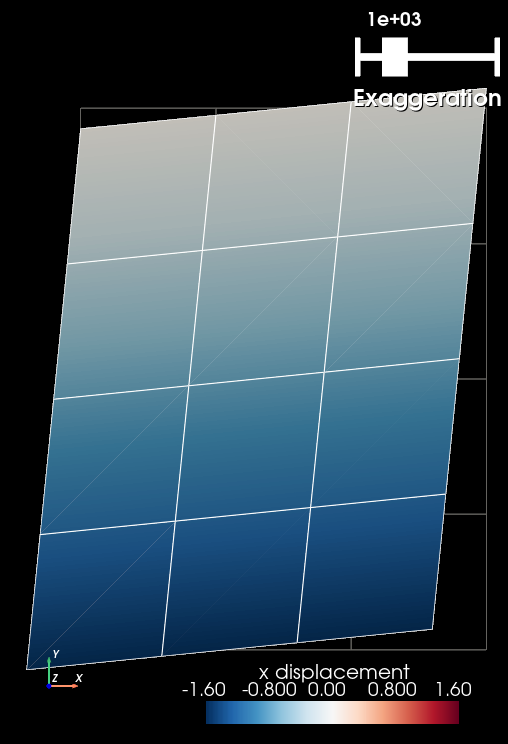
Fig. 32 Solution for Step 3. The colors of the shaded surface indicate the x displacement, and the deformation is exaggerated by a factor of 1000. The undeformed configuration is shown by the gray wireframe. The solution matches the one from Step 2.#