

Code Structure#
Legend for class diagrams#
Abstract classes are shown in the yellow boxes.
Concrete classes are shown in the green boxes.
Inheritance is denoted by an arrow.
Aggregation is denoted by the a diamond and arrow.
Application#
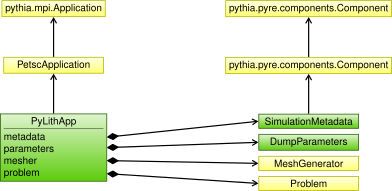
Fig. 200 Diagram showing the relationships among objects associated with PyLithApp.#
Problem#
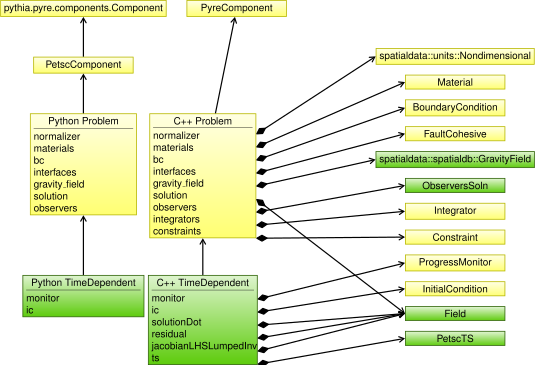
Fig. 201 Diagram showing the relationships among the Python and C++ Problem objects and their data members.#
Solution#
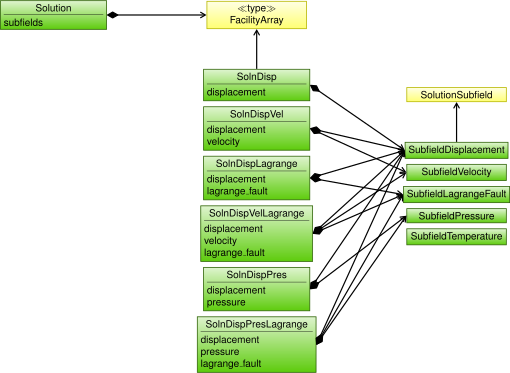
Fig. 202 Diagram showing the relationships among the Python and C++ Solution objects and their data members.#
Physics and Finite-Element Objects#
We separate the specification of the physics from the finite-element operations.
That is, we have one set of objects that specify the physics through materials, boundary conditions, and faults; another set of objects perform the finite-element operations required to solve the equations.
Fig. 203 illustrates this separation.
The user specifies the parameters for the Physics objects, which each create the appropriate integrator and/or constraint via factory methods.
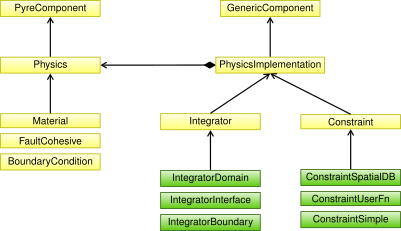
Fig. 203 Diagram showing the relationships among objects specifying the physics and the finite-element implementations.#
We generalize the finite-element operations into two main classes: Integrator and Constraint.
The Integrator is further separated into concrete classes for performing the finite-element integrations over pieces of the domain (IntegratorDomain), pieces of the domain boundary (IntegratorBoundary), and interior interfaces (IntegratorInterface).
We implement several kinds of constraints, corresponding to how the values of the constrained degrees of freedom are specified.
ConstraintSpatialDB gets values for the constrained degrees of freedom from a spatial database; ConstraintUserFn gets the values for the constrained degrees of freedom from a function (this object is widely used in tests); ConstraintSimple is a special case of ConstraintUserFn with the constrained degrees of freedom set programmatically using a label (this object is used for constraining the edges of the fault).
Problem holds the Physics objects as materials, boundary conditions, and interfaces.
During initialization of Problem, each Physics object creates any necessary Integrator and Constraint objects to implement the physics.
For example, a material will create an IntegratorDomain object that performs integration over that material’s cells.
Materials#
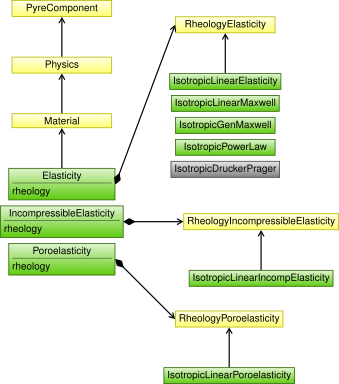
Fig. 204 Diagram showing the relationships among objects associated with materials.#
Boundary Conditions#
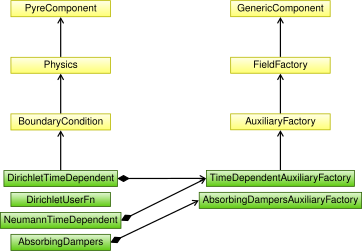
Fig. 205 Diagram showing the relationships among objects associated with boundary conditions.#
Interior Interfaces (Faults)#
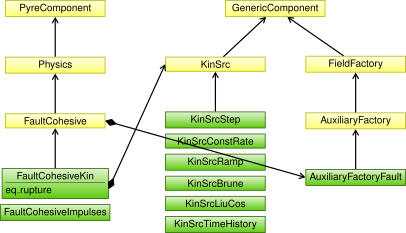
Fig. 206 Diagram showing the relationships among objects associated with faults.#
Mesh Importing#
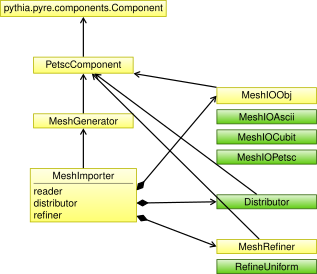
Fig. 207 Diagram showing the relationships among objects associated with mesh generation and importing.#
Output#
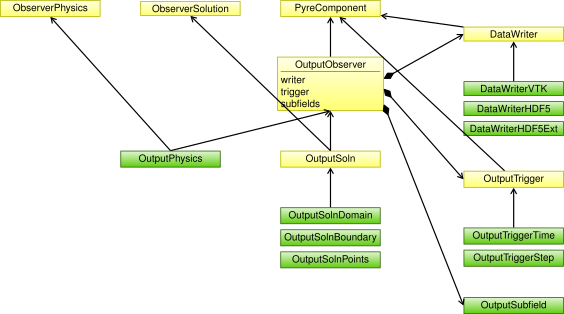
Fig. 208 Diagram showing the relationships among objects associated with output.#