

Cubit Mesh#
Geometry#
We construct the geometry by first creating points, then connecting the points into curves, and finally the curves into a surface. Fig. 113 shows the geometry and variables names of the vertices and curves.
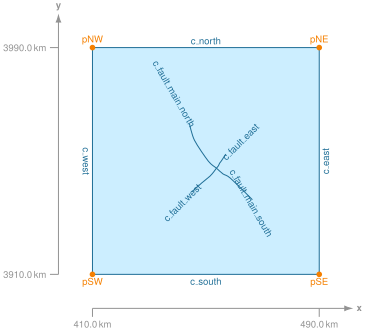
Fig. 113 Geometry created in Cubit for generating the finite-element mesh. The names of the vertices and curves match the ones we use in the Cubit Python script.#
Meshing using Python Script#
We use the Python script generate_cubit.py to generate the mesh.
The Python script is setup so that it can be run from within Cubit or as a standalone Python script without the Cubit GUI interface.
In this example, we will run the script from within Cubit using the Journal editor.
Open the Python script generate_cubit.py in the Cubit journal editor.
Play the selected script or play the lines, making sure you play the first line so that Cubit uses the Python interpreter when running the script.
We specify the parameters controlling the geometry, mesh size, and cell shape near the top of the script.
Important
In most cases, we name the geometric entity immediately after creating it, so that we can refer to it later. There are a few cases, such as splitting curves, in which we do not know the ids of the newly created entities. In these cases we use the GUI to identify the curves and use special Cubit functions that allow us to specify a geometric entity based on location. This results in Cubit commands that are independent of the version of the underlying geometry libraries.
Note
We use the skeleton sizing function to set cell sizes that increases at a geometric rate with distance from the fault. This makes it easy to specify a fine cell size near the fault where the solution has greater spatial variability and a coarse cell size near the boundaries where the solution is very smooth.
After running the Python script in Cubit, you will have a corresponding Exodus-II file (mesh_tri.exo).
This is a NetCDF file, and it can be loaded into ParaView.

Fig. 114 Finite-element mesh with triangular cells generated by Cubit (viewed using Cubit).#